Loading ...

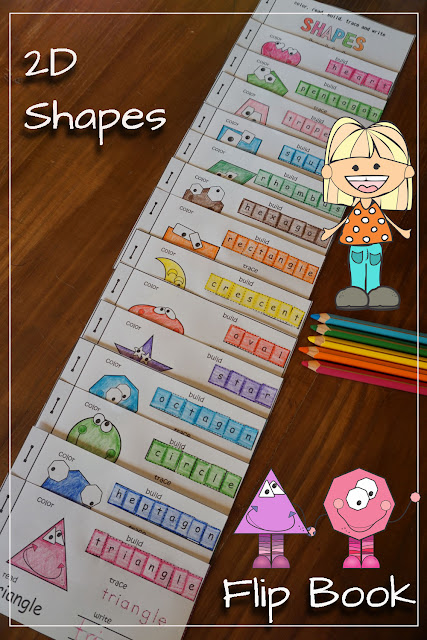
2D Shapes Flip Book

Teach shapes to kids with a fun and educational flip book which contains 14 2D shapes triangle, rectangle, square, circle, star, heart, crescent, oval, pentagon, hexagon, heptagon, octagon, rhombus, trapezoid


2D Shapes Flip Book Cut and Paste Activity

I love flip books because  they make learning fun! My students enjoy creating them, but also love to read them over and over again.
The best of all, there is no use of costly colored ink. Just print the black&white pages and you are ready to go!

2D Shapes Flip Book Cut and Paste Activity

Kiddos begin by the cutting out the pages...anything that involves cutting is fun, isn't it?
2D Shapes Flip Book Cut and Paste Activity

 Color, read, trace and write each shape...
2D Shapes Flip Book Cut and Paste Activity

Cut out the letters...
2D Shapes Flip Book Cut and Paste Activity

Paste the correct letter into each box...
2D Shapes Flip Book Cut and Paste Activity


2D Shapes Flip Book Cut and Paste Activity

And voila students are ready to staple their flip books.
2D Shapes Flip Book Cut and Paste Activity


2D Shapes Flip Book Cut and Paste Activity

Included in this resource: triangle, rectangle, square, circle, star, heart, crescent, oval, pentagon, hexagon, heptagon, octagon, rhombus, trapezoid.

https://www.teacherspayteachers.com/Product/2D-Shapes-Flip-Book-2875328


Need other flip books? Check out my Flip Books Post.


COMMENTS

Loaded All Posts Not found any posts VIEW ALL Readmore Reply Cancel reply Delete By Home PAGES POSTS View All RECOMMENDED FOR YOU LABEL ARCHIVE SEARCH ALL POSTS Not found any post match with your request Back Home Sunday Monday Tuesday Wednesday Thursday Friday Saturday Sun Mon Tue Wed Thu Fri Sat January February March April May June July August September October November December Jan Feb Mar Apr May Jun Jul Aug Sep Oct Nov Dec just now 1 minute ago $$1$$ minutes ago 1 hour ago $$1$$ hours ago Yesterday $$1$$ days ago $$1$$ weeks ago more than 5 weeks ago Followers Follow THIS PREMIUM CONTENT IS LOCKED STEP 1: Share to a social network STEP 2: Click the link on your social network Copy All Code Select All Code All codes were copied to your clipboard Can not copy the codes / texts, please press [CTRL]+[C] (or CMD+C with Mac) to copy Table of Content